
What are project instalments?
Project instalments refer to the payment schedule of the project budget into smaller, manageable amounts, which are paid over a specified period.
For example:
- Initial Instalment – Paid at the start of the project, often covering planning and early-phase activities.
- Interim Instalments – Paid upon reaching specific, predefined milestones or deliverables.
- Final Instalment – Paid upon completion of the project, after all work has been finalized and accepted.

How to add project instalments?
When adding a new project, you have the option to choose whether or not to set up instalments. If you choose to use instalments, select “Instalments Planning” when creating the project.

After the project is created, you can add instalments by navigating to Project Info and clicking +Add in the Project Instalments section.

From there, you can input the title, select the period, and enter the amount for the instalment. You can also edit or delete instalments by clicking on the relevant icon.
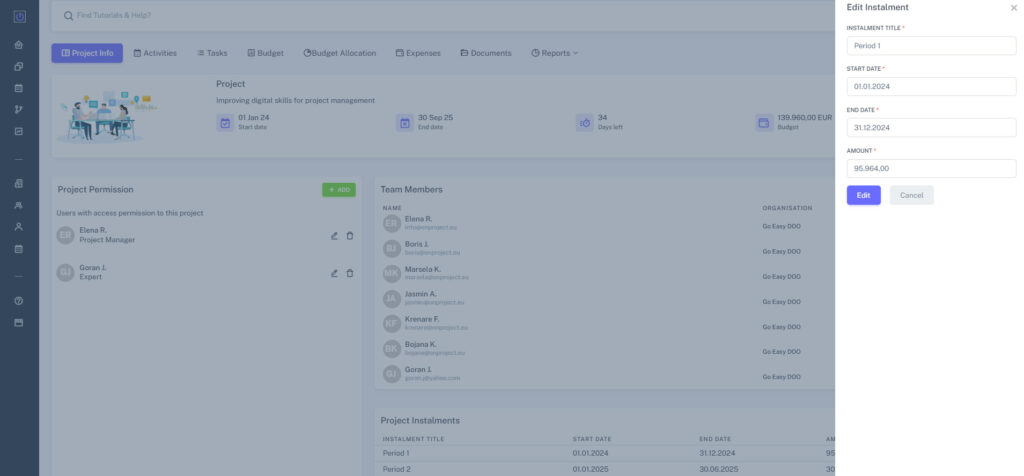
Once added, instalments will appear in the Budget Allocation, Expenses, Documents, and Reports menus.
Note: Budget item allocation per instalment is done in the tab Budget Allocation, not in the Project Info. In the Project Info, you just add the instalments as items.
